Ownership gets blurred
Account owners, engagement owners, reviewers and delivery teams all need context, but spreadsheets rarely show who is accountable now.
Caspia helps professional-services and operations teams manage accounts, engagements, service lines, workstreams, tasks, workload, delegation, financial reporting and risk without relying on fragile spreadsheets.
The spreadsheet ceiling
Spreadsheets are easy to start with, but they become fragile when multiple teams, service lines, regions, reviewers and deadlines are involved.
Account owners, engagement owners, reviewers and delivery teams all need context, but spreadsheets rarely show who is accountable now.
A green cell from last week can hide an overdue task, a blocked workstream or a missing client response.
Deadlines, blockers, comments and review notes live across tabs, emails, chats and meetings.
Task counts do not show who is overloaded, who is waiting and where capacity is about to break.
Work is handed from one person to another, but the handoff trail is rarely visible when something slips.
Managers rebuild active portfolio, financial year, service-line and generated-fee reporting instead of acting on the risks behind it.
What Caspia provides
Caspia gives delivery leads and managers a structured way to see what is moving, what is blocked, who owns it and where attention is needed.
Track every engagement by account, service line, owner, financial year, deadlines, risk and outstanding tasks.
Review active portfolio value, agreed values and generated fees across financial years, accounts and service lines.
Separate account relationship ownership from engagement delivery ownership, review responsibility and task execution.
Surface critical engagements, overdue tasks, blocked workstreams and items waiting on clients or stakeholders.
See who is carrying too much work and where delivery pressure is building across teams.
Track who delegated work, who owns it now and which handoffs have gone stale.
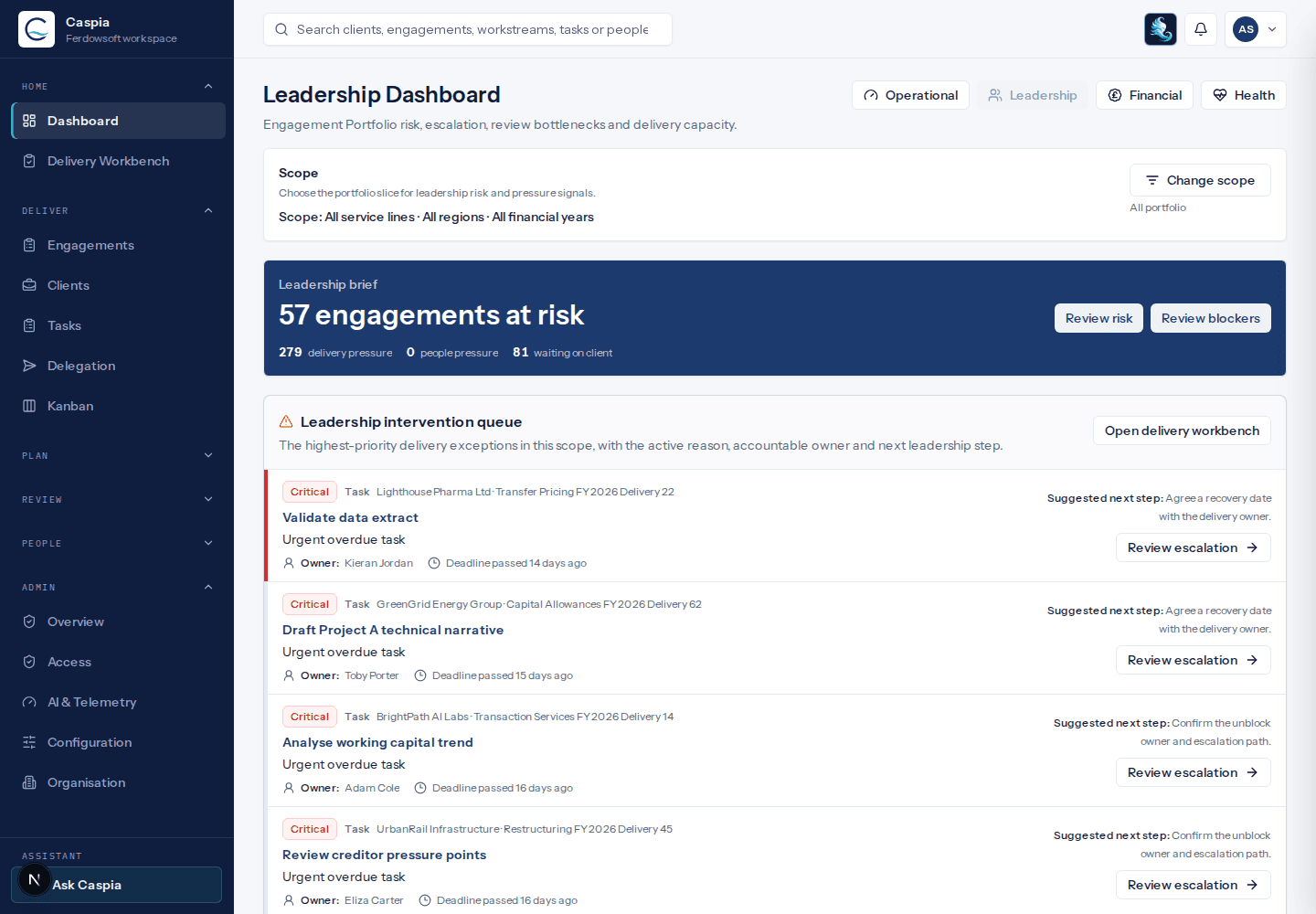
Give partners, directors and practice leads a concise view of risk, escalation and delivery capacity.
Support service-line, team and regional visibility so users see the work relevant to their role.
Chat with a read-only assistant that uses permission-filtered Caspia data and safe tool traces.
Ask Caspia
Ask Caspia lets users ask operational questions against the same scoped Caspia data they can already access. Provider keys stay in the backend, the assistant stays read-only, and admins can see whether the connection is configured without exposing secrets.
Ask Caspia
Read-only assistant
You
Which engagements need attention before the weekly review?
Ask Caspia
I found critical delivery risk, overdue review work and two overloaded owners in your visible portfolio.
How Caspia works
Caspia separates who the work is for from the work being delivered. One account can have multiple engagements running at the same time, each with its own service line, financial year context, workstreams, deadlines, owners and risk.
Account / Client / Business Unit / Applicant
contains
Engagement / Initiative / Matter / Review
contains
Service Line / Practice Area / Offering
contains
Workstream / Phase
contains
Task
has owners, reviewers, delegators, dates and risk signals
Core product views
Product previews shown here reflect Caspia's current app surfaces using the same account, engagement, service-line and financial reporting model.
Start with a live view of delivery risk, active portfolio value, overdue work, blockers and over-capacity people.
Use the engagement matrix to scan delivery status across accounts, service lines, workstreams and owners.
Compare financial years, active portfolio status, generated fees and account or service-line value.
Filter operational work by account, engagement, workstream, owner, reviewer, delegator, status, priority and due date.
See who is overloaded, which tasks are overdue and where workload is fragmented across engagements.
Follow delegated work and stale handoffs so responsibilities do not disappear between people.
Switch between timeline planning and status-board execution without losing account and engagement context.
Explore relationships between accounts, engagements, workstreams, tasks and people to find bottlenecks.
Configure hierarchy, financial years, service lines, roles and regional visibility so teams see the work relevant to them.
Ask operational questions against visible Caspia data through a server-side, read-only LLM gateway.
Use cases
Caspia keeps the core model consistent while allowing controlled terminology for domains that call accounts, engagements or workstreams by different names.
Track account relationships, engagements, service lines, reviewers, financial years and delivery deadlines.
Manage evidence, technical review, cost analysis, client queries, partner review, financial year and submission work.
Coordinate multiple client engagements while keeping ownership, blockers and review points visible.
Follow customer implementations across workstreams, technical owners and go-live deadlines.
Run transformation and operational initiatives with clear ownership, workload and escalation visibility.
Track applications, evidence requests, review stages, deadlines and stakeholder responses with controlled terminology.
Why different
Caspia is built around delivery accountability, not just flexible lists. It keeps portfolio risk, ownership, workload, financial context and scope in one operating model.
| Area | Spreadsheets | Generic task tools | Caspia |
|---|---|---|---|
| Portfolio visibility | Manual tabs and status colours | Boards and lists, often project-by-project | Engagement-by-workstream portfolio matrix |
| Engagement structure | Usually recreated in each file | Flexible, but often configured from scratch | Account, engagement, service line, workstream and task model |
| Ownership and review | Often unclear or outdated | Assignee-focused | Account owner, engagement owner, reviewer and delegator context |
| Service-line reporting | Requires manual grouping and clean-up | Possible after custom field setup | Built into hierarchy, scope and portfolio views |
| Financial-year reporting | Maintained through separate worksheets | Usually needs custom dashboards | Financial years, active portfolio and generated-fee views |
| Delegation tracking | Usually lost in comments or messages | Assignment changes with limited handoff context | Delegation and stale handoff views |
| Workload/capacity | Difficult to aggregate | Available but often separated from delivery risk | Workload linked to engagements, risk and deadlines |
| Risk and blockers | Spread across tabs, notes and meetings | Tracked inside individual projects or boards | Visible across portfolio, workstreams and tasks |
| Leadership reporting | Prepared manually | Possible with setup and dashboards | Delivery, active portfolio and commercial context shaped for review |
| AI assistance | Usually disconnected from live delivery context | Often generic chat or workspace search | Read-only Ask Caspia assistant using permission-filtered data |
| Scoped visibility | Hard to control | Possible but often complex | Designed for service-line, team and regional scope |
| Auditability | Version history is fragmented | Activity trails vary by workspace setup | Delivery context kept with ownership and handoffs |
Example workflow
Start with delivery and commercial portfolio health: critical engagements, blockers, overdue tasks and over-capacity people.
Filter by financial year, service line, team or region to focus on the scope you manage.
Use the portfolio matrix to see which account, service line or workstream is causing the risk.
Open the relevant task, owner, reviewer and delegation context.
Use the read-only assistant to summarise visible risk, blockers or workload before the review.
Follow up, rebalance workload, update status or prepare the next delivery and commercial review.
Demo workspace
Explore a demo workspace with sample accounts, engagements, service lines, workstreams, tasks, risk signals, workload and financial reporting data. No setup required.
FAQ
Caspia includes task, Kanban, Gantt and portfolio views, but it is designed around delivery control rather than generic project tracking. It focuses on accounts, engagements, service lines, workstreams, workload, blockers, delegation, financial context and risk.
Spreadsheets can track lists, but they struggle with ownership, delegation, workload, financial years, service-line reporting, risk, audit trails and scoped visibility. Caspia turns delivery data into live operational views.
Generic tools are flexible, but teams often need to design their own delivery model. Caspia starts with a structured account, engagement, service-line and workstream model and gives delivery leaders portfolio, risk, workload and delegation views out of the box.
No. Caspia is strongest for client and account delivery, but controlled terminology can also support internal initiatives, implementations, matters, reviews and applications where work is split across workstreams and people.
Yes. Caspia is designed around accounts with multiple engagements, each with its own service line, workstreams, owners, deadlines, financial year context and risk.
No. Caspia is not a billing, accounting, payment or CRM system. It focuses on delivery visibility, accountability and portfolio reporting, and can sit alongside finance, CRM and document systems.
Caspia supports scoped visibility using organisation hierarchy, teams, financial permissions and optional regional structures so users see the work relevant to their role.
Ask Caspia is the in-app read-only assistant. System Admins connect a server-side LLM provider, and users can ask operational questions against the Caspia data they are already allowed to see.
No. Provider keys stay in the backend environment, the browser sees only redacted configuration status, and Ask Caspia uses backend permission checks before returning visible data.
Yes. The demo workspace lets you explore Caspia using sample delivery data.
Caspia is available for controlled pilots with selected teams. A pilot is best suited to teams currently managing delivery through spreadsheets, email, meetings and generic task tools.
Which engagements are at risk, blocked or waiting today?
Who owns the work now, who reviews it and who delegated it?
Where is workload pressure building before deadlines slip?
Use active portfolio, financial year and generated-fee views for reporting.